
Thermal Camera+ for FLIR One3.0.0 - Google Play
You'll be able to see results in few seconds.
Publisher Description
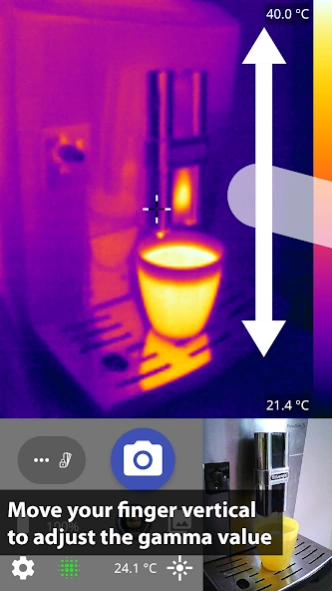


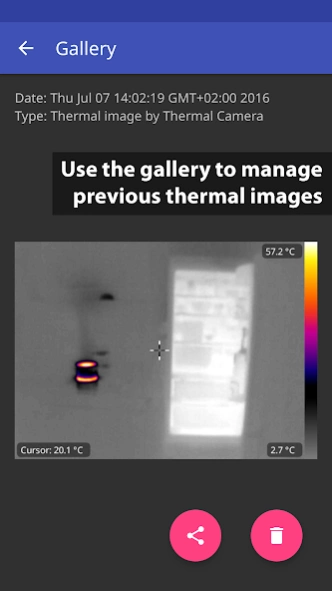
Thermal Camera+ is an advanced imaging software for the Flir One and Cat S60®.
PLEASE NOTE: ###This application requires the FLIR One USB thermal camera or S60 device (hardware) to be connected to your smartphone. ###
For details to the FLIR One, please visit http://www.flir.de/flirone/ios-android/
For a manual please see: http://thermcam.binaryblogger.de/manualA/
Please test my free app (Thermal Camera for FLIR One) first to figure out if everything works fine for you before buying.
Thermal Camera+ for FLIR One is a viewer application for the external FLIR One camera and the Cat S60® smartphone. By using the raw data from the thermal camera, it can use the full capabilities of the hardware.
Plus Features:
- Gallery for thermal images
- Adjust temperature range (long press min/ max values)
- Multi-frame Super Resolution
- If the icon is green: Super Resolution works
- If the icon is red: SR couldn't blend over the last frames and doesn't work
- change the sharpening mode (in the settings)
- MSX offset correction
- Live identification of minimum and maximum
- No watermark
- Hide the real color image
- Nearest neighbour scaling mode
- Manual shutter mode (long click shutter icon)
- Can save:
- MSX Images (FLIR radiometric JPG)
- Non-MSX Images (New algorithm)
- Real Color Images
Free Features:
- manual gamma regulation of color scale
- full Lepton 3 sensor resolution 160x120
- original SDK MSX mode
- higher precision for calibration data
- lock of temperature range
- FLIR Tools integration
- on-screen temperature
Supported Devices:
- FLIR One v2 for Android (FLIR ONE App)
- Cat S60® Smartphone (MyFLIR for Cat S60)
About Thermal Camera+ for FLIR One
The company that develops Thermal Camera+ for FLIR One is Elisabeth Friedrich. The latest version released by its developer is 3.0.0.
To install Thermal Camera+ for FLIR One on your Android device, just click the green Continue To App button above to start the installation process. The app is listed on our website since 2017-12-23 and was downloaded 0 times. We have already checked if the download link is safe, however for your own protection we recommend that you scan the downloaded app with your antivirus. Your antivirus may detect the Thermal Camera+ for FLIR One as malware as malware if the download link to georg.com.thermal_camera_plus is broken.
How to install Thermal Camera+ for FLIR One on your Android device:
- Click on the Continue To App button on our website. This will redirect you to Google Play.
- Once the Thermal Camera+ for FLIR One is shown in the Google Play listing of your Android device, you can start its download and installation. Tap on the Install button located below the search bar and to the right of the app icon.
- A pop-up window with the permissions required by Thermal Camera+ for FLIR One will be shown. Click on Accept to continue the process.
- Thermal Camera+ for FLIR One will be downloaded onto your device, displaying a progress. Once the download completes, the installation will start and you'll get a notification after the installation is finished.
Program Details
System requirements
Download information
Pricing
Version History
version 3.0.0
posted on 2017-12-23
- update to include support for the new FLIR ONE generation 3 and FLIR ONE Pro
- images can now be taken with the volume keys (optional)
- shutter sound when taking an image (optional)
- all elements from Thermal Image I can now be hidden (optional)
Disclaimer
Official Google Play Link
We do not host Thermal Camera+ for FLIR One on our servers. We did not scan it for viruses, adware, spyware or other type of malware. This app is hosted by Google and passed their terms and conditions to be listed there. We recommend caution when installing it.
The Google Play link for Thermal Camera+ for FLIR One is provided to you by apps112.com without any warranties, representations or guarantees of any kind, so access it at your own risk.
If you have questions regarding this particular app contact the publisher directly. For questions about the functionalities of apps112.com contact us.
